Table of Contents
- Can You Add a Disc Drive to PS5 Slim Digital?
- PS5 Slim Digital Edition Disc Drive Compatibility
- PS5 Detachable Disc Drive Installation: Step-by-Step
- How to Set Up a Disc Drive for PS5
- PS5 Slim Digital vs Disc Edition: Which Should You Choose?
- Common Mistakes and Troubleshooting Tips
- Frequently Asked Questions
Last Updated: 12 October 2026
Can You Add a Disc Drive to PS5 Slim Digital?
Yes, you can add a disc drive to the PS5 Slim Digital, and it is easier than you think. Sony designed the Slim Digital Edition with a detachable disc drive port, so you can upgrade to disc playback later without buying a whole new console. This guide from Gamerium walks you through compatibility, installation, and setup.
The PS5 Slim Digital Edition is the newer, slimmer version of Sony's all-digital console. It ships without a disc drive but includes a port on the side for the official detachable disc drive. That means physical games, 4K Blu-rays, and second-hand discs stay within reach.
Below, we will show you exactly how to add the drive, what you need beforehand, and the mistakes that trip people up. PlayStation official support on the disc drive
PS5 Slim Digital Edition Disc Drive Compatibility
The detachable disc drive works only with the PS5 Slim Digital Edition. It does not fit the original launch PS5 Digital Edition, which has no drive port at all.
So before you buy anything, check which console you own. The Slim model is smaller and lighter, with a glossy panel on one side and a matte finish on the other.
Which PS5 Models Support the Detachable Disc Drive
- PS5 Slim Digital Edition: Supports the detachable disc drive
- PS5 Slim (disc model): Already has a built-in drive, no upgrade needed
- Original PS5 Digital Edition: No drive port, not compatible
- Original PS5 (disc model): Built-in drive, no upgrade needed
If you are unsure, look at the model number on the base of your console. Slim models carry a CFI-2000 series number.
What You Will Need Before You Start
- The official detachable disc drive for PS5 Slim
- A clean, flat surface with good lighting
- A soft cloth to protect the console
- Your console's power cable, unplugged
- Around 15 to 20 minutes of your time
A common mistake is buying a third-party drive that looks similar. Only the official Sony drive pairs with the console's software.
PS5 Detachable Disc Drive Installation: Step-by-Step
The installation is simple once you know the order of steps. You slide the drive into the port, secure it, and let the console recognise it on the next boot.
Here is the full process, from powering down to the final cover.
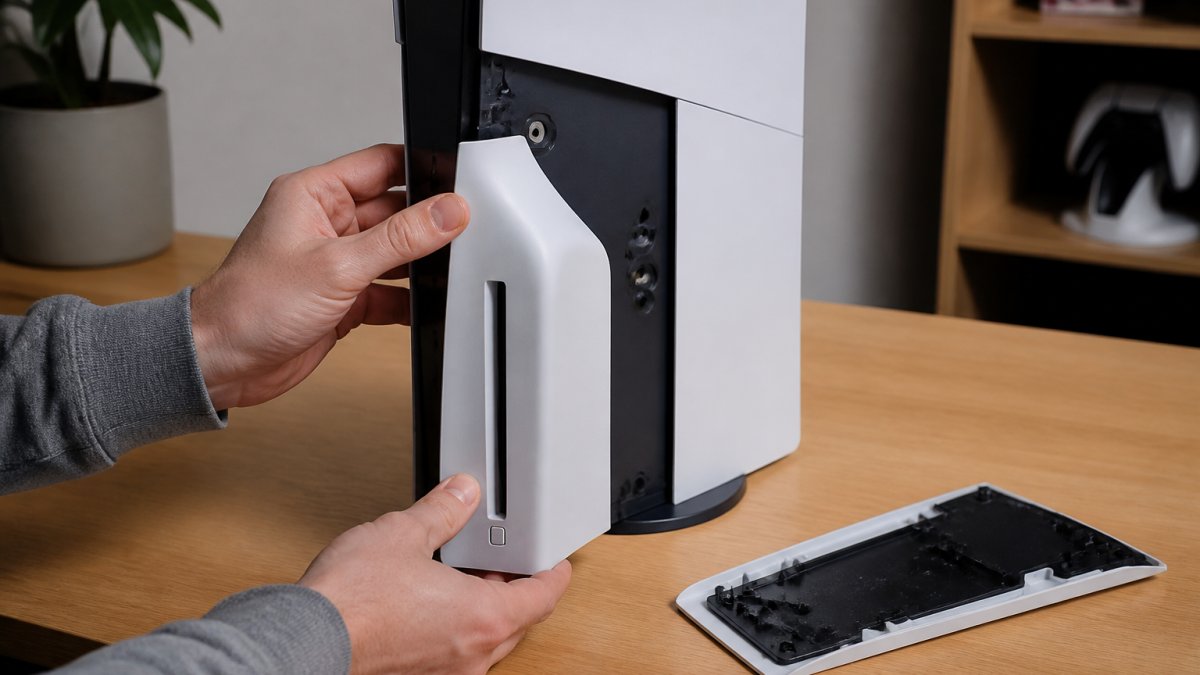
Step 1: Power Down and Remove the Stand
Unplug the console and let it cool for a few minutes. If your console sits vertically, remove it from its stand first.
Lay the console flat on a soft cloth. This keeps the panels scratch-free and gives you room to work.
Step 2: Attach the Disc Drive to the Console
Line up the drive with the port on the side of the console. The connector should sit flush before you push.
Slide the drive in gently until it clicks. Do not force it. If it resists, check the alignment and try again.
Step 3: Secure the Drive and Replace the Cover
Once the drive is seated, secure it into place. Then replace the side cover panel.
The cover should snap into place with light pressure. If it bulges, the drive is not fully seated.
How to Set Up a Disc Drive for PS5
Setting up the drive takes just a few minutes once it is physically attached. Power the console back on and let it detect the new hardware.
Follow these steps:
- Reconnect the power cable and switch the console on
- Wait for the on-screen prompt about the disc drive
- Connect to the internet if prompted
- Let the console pair the drive automatically
- Insert a disc to test playback
The console may ask you to register the drive online. This links the drive to your console so it cannot be used elsewhere.
PS5 Slim Digital vs Disc Edition: Which Should You Choose?
The right pick depends on how you buy your games. The table below sums up the trade-offs.
| Factor | Slim Digital | Slim Disc Edition |
|---|---|---|
| Upfront cost | Lower | Higher |
| Disc drive | Add-on | Built in |
| Physical games | Via add-on drive | Straight away |
| Pre-owned discs | Yes, with drive | Yes |
| 4K Blu-ray playback | With drive | Yes |
| Best for | Digital-first buyers | Disc collectors |
If you mostly buy digital, the Digital Edition plus a later drive keeps your options open. If you want discs from day one, the Disc Edition saves you the extra step.
Common Mistakes and Troubleshooting Tips
Most problems come down to alignment, power, or setup order. Here are the fixes for the issues we hear about most.
- Drive not detected: Power down fully, reseat the drive, and restart
- Cover will not close: The drive is not seated all the way, push it in until it clicks
- Disc not reading: Check for smudges and clean the disc
- Pairing failed: Reconnect to the internet and retry the setup
- Console overheating: Make sure the vents are clear and the drive sits flush
If the drive still will not register after a reseat, contact PlayStation support. Do not keep forcing it.
At Gamerium, we stock consoles, accessories, and the latest releases for PlayStation, Xbox, and Nintendo. Our family-run team offers free delivery and hassle-free returns within 30 days.
Frequently Asked Questions
Can you add a disc drive to a PS5 Slim Digital Edition?
Yes. The PS5 Slim Digital Edition has a port on the side that accepts the detachable disc drive. You can buy the drive separately and attach it yourself. Once fitted, the console works just like a standard PS5 Slim with a disc drive, letting you play physical PS5 and PS4 game discs. It is a straightforward upgrade that takes only a few minutes.
Does the PS5 Slim disc drive need to be paired with the console online?
Yes. When you first attach the disc drive, the console will prompt you to pair it online. You need an internet connection and a PlayStation Network account for this one-time activation. After pairing, the drive works offline. If you ever remove the drive and attach it to a different console, you will need to pair it again online.
Can you use an external disc drive with a PS5 Slim Digital?
No. The PS5 does not support external disc drives. The only official option is the detachable disc drive designed for the PS5 Slim Digital Edition. Third-party external drives will not work because the console's software does not recognise them for game playback. Always use the official detachable drive for compatibility and to avoid potential issues with future system updates.
Can the PS5 Slim disc drive play PS4 games?
Yes. The detachable disc drive plays both PS5 and PS4 physical game discs. It also handles Blu-ray and DVD movies. Compatibility is the same as the disc drive built into the standard PS5 Slim. Some region-locked DVDs may not play, but PS4 and PS5 games are not region-locked, so imported discs will work.
Adding a disc drive to your PS5 Slim Digital opens up physical games, pre-owned bargains, and 4K Blu-rays without replacing your console. The process is quick, but only the official drive will pair properly. Gamerium makes it easy to grab the drive, the games, and everything else you need, with competitive pricing, free delivery, and hassle-free returns within 30 days. Get started with Gamerium and get your setup disc-ready today.