

Quick Summary
To check PS5 Slim disc drive region compatibility, confirm the drive matches your console model and read the product listing and manufacturer notes for any stated region restriction. Then check your console's region setting against the disc's region code, which is printed on the packaging.
- Confirm your console is a Digital Edition or Slim model before ordering the drive.
- Check the product description and manufacturer notes for any stated region restriction.
- Look for the region code, such as Region 2 for UK and Europe, on the disc packaging.
- Power off the console completely before attaching the drive.
- If a listing does not mention region limits, read the details or ask the seller before buying.
Table of Contents
- Why Region Coding Matters for PS5 Discs
- Understanding Region Codes on PS5 Game Discs
- Is the PS5 Slim Disc Drive Region-Locked?
- PS5 Slim Disc Drive Model Compatibility
- Setting Up and Pairing the PS5 Digital Edition Add-on Disc Drive
- Common Region Codes and Where They Apply
- Ordering Your Disc Drive From Gamerium
- Frequently Asked Questions
How to Check PS5 Slim Disc Drive Region Compatibility
Last Updated: October 28, 2026
Why Region Coding Matters for PS5 Discs
Region coding decides which discs your console will read. It is worth checking before you spend money. A disc that will not play is a waste of both time and cash.
Region coding is a set of rules that limits where a disc can be played. Publishers use it to control release windows and regional pricing. For UK buyers, the main concern is whether a disc from another part of the world will work on a console bought here.
Most UK-bought PS5 consoles and UK-region games share the same region setting. Problems tend to show up when someone imports a disc or buys a disc drive from another market. Checking before you order saves a lot of frustration.
Understanding Region Codes on PS5 Game Discs
Each PS5 game disc carries a region code printed on the case or disc label. The code tells you which region the disc is designed for.
The main points to know:
- Region codes are short labels such as "UK" or "EU" printed on packaging.
- Discs are sold for specific regions, and the code signals that intent.
- Compatibility depends on both the disc and the console's region setting.
Look at the back of the case first. Then check the disc itself. A mismatch is easy to spot once you know where to look.
Is the PS5 Slim Disc Drive Region-Locked?
This is the question most buyers want answered. The short answer is that you should check the specific product listing and manufacturer details before buying, because region behaviour can vary between models and firmware updates.
Here is what to check:
- The product description for any stated region restriction
- The manufacturer's compatibility notes
- Your console's region and language settings
If a listing does not mention region limits, do not assume it has none. Read the details or ask the seller before you buy.
PS5 Slim Disc Drive Model Compatibility
Not every disc drive fits every console. Before you buy, confirm that the drive matches your PS5 model. A PS5 Slim Digital console needs an add-on drive designed for that model.
Disc Drive For PS5 Digital Edition Consoles (PS5) →
Quick checks before ordering:
- Confirm your console is a Digital Edition or Slim model.
- Check the drive's listed compatible models.
- Keep your console's model number handy when you shop.
Gamerium sells the Disc Drive For PS5 Digital Edition Consoles. Check the listing against your model before you order.
Setting Up and Pairing the PS5 Digital Edition Add-on Disc Drive
Setting up the drive involves a few steps. Follow the instructions included with your drive, as they reflect the exact model.
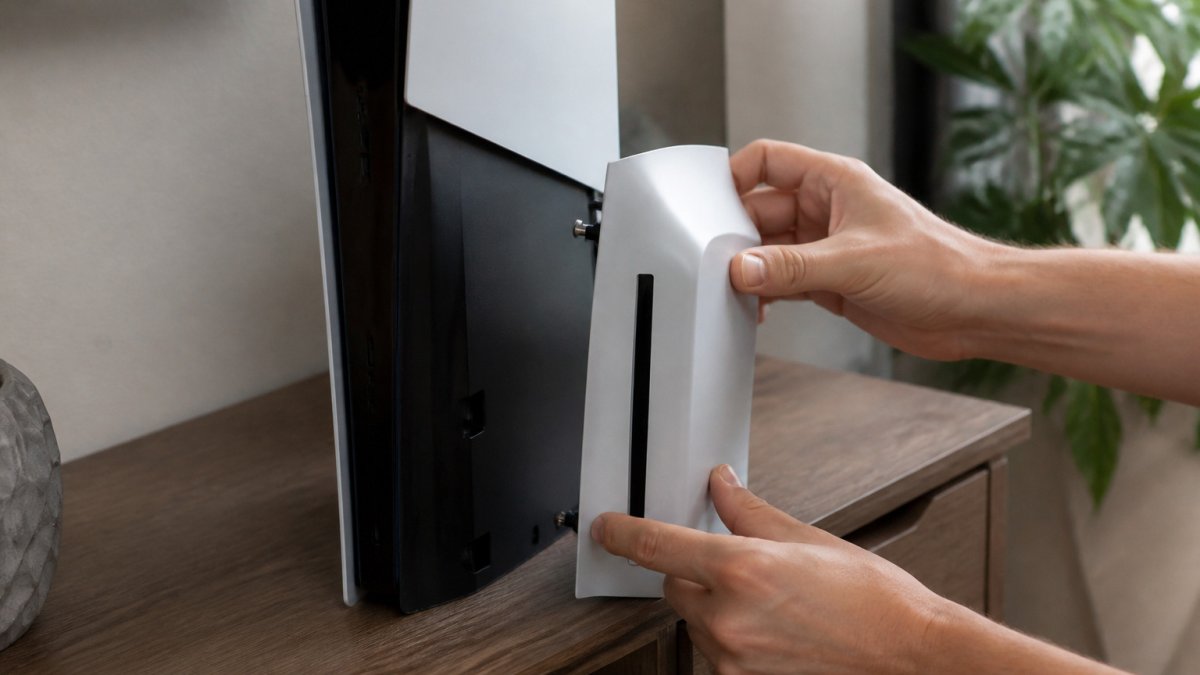
Pairing and Setup Steps
- Power off the console completely before attaching the drive.
- Connect the drive to the designated port on the console.
- Power the console back on and wait for the system to recognise the drive.
- Insert a disc and confirm it reads correctly.
- Check the region settings if the disc does not load.
Common Region Codes and Where They Apply
Region codes group countries and territories into zones. Knowing the common codes helps you spot a mismatch fast.
- Region 2 / UK and Europe: The standard for UK-bought discs and consoles.
- Region 1 / Americas: Common for discs sold in North America.
- Region 3 / Asia: Used across parts of East and Southeast Asia.
Check the packaging of any disc you plan to buy. If the region does not match your console's setting, the disc may not play. When in doubt, buy discs labelled for the UK.
The table below summarises the main region codes and where each one applies.
| Region code | Where it applies | Note |
|---|---|---|
| Region 2 | UK and Europe | Standard for UK-bought discs and consoles |
| Region 1 | Americas | Common for discs sold in North America |
| Region 3 | Asia | Used across parts of East and Southeast Asia |
Ordering Your Disc Drive From Gamerium
If you have confirmed compatibility, you are ready to order. Gamerium offers free UK delivery and hassle-free returns within 30 days.
Explore the Disc Drive For PS5 Digital Edition Consoles on our site, or read our guide to whether you can add a disc drive to PS5 Slim Digital. When you are ready to buy, our guide to where to buy a PS5 Slim disc drive covers your options.

Frequently Asked Questions
Is the PS5 Slim disc drive region-locked?
The PS5 Slim disc drive does not enforce region locking in the way older consoles did. Disc compatibility depends largely on the game's own region coding and on the console's region settings, so a disc from another region may or may not run. Check the disc's region code against your console's region setting before you buy imported media, and treat any region mismatch as a risk rather than a guarantee of failure or success.
Can a UK PS5 Slim play games bought in another region?
Often, but not always. A UK PS5 Slim is set to the UK region, and games from other regions may require a region change or may not load at all. Check the packaging and the disc's region information first. If you are buying from outside the UK, confirm the disc is compatible with a UK console before you order, since returns on imported media can be difficult.
Does the PS5 Slim disc drive work with every PS5 Digital Edition?
Gamerium's Disc Drive For PS5 Digital Edition Consoles is sold at £64.99 and is listed as a brand new Sony-published accessory for PlayStation 5.
