

Last Updated: 4 November 2026
Quick Summary
A detachable disc drive lets a PS5 Slim Digital Edition read physical discs. It is sold separately, slides into a slot on the console's side panel and locks with a click, with no tools needed. Check the model number against the drive's compatibility information before buying.
- The drive slides into a slot on the side panel and locks with a simple click.
- Remove the cover plate first, align the connector, and press until it seats flush.
- Confirm the console's model number matches the drive's compatibility information before ordering.
- Buy a second controller first if more than one person plays locally.
- Check that any storage expansion meets the console's stated speed and size requirements.
Table of Contents
- Can You Add a Disc Drive to a PS5 Slim Digital Edition?
- Essential Accessories for a New PS5 Slim Owner
- Choosing a Vertical or Horizontal Console Stand
- Keeping Your DualSense Charged With a Charging Station
- Best PS5 Slim Cooling Accessories and Their Noise Trade-Offs
- Storage, Headsets and Remotes: Filling the Gaps
- Building Your PS5 Slim Setup Around Your Next Purchase
- Frequently Asked Questions
Can You Add a Disc Drive to a PS5 Slim Digital Edition?
A detachable disc drive turns a Digital Edition into a console that reads physical media. The drive is sold separately and attaches to the side of the console without tools.
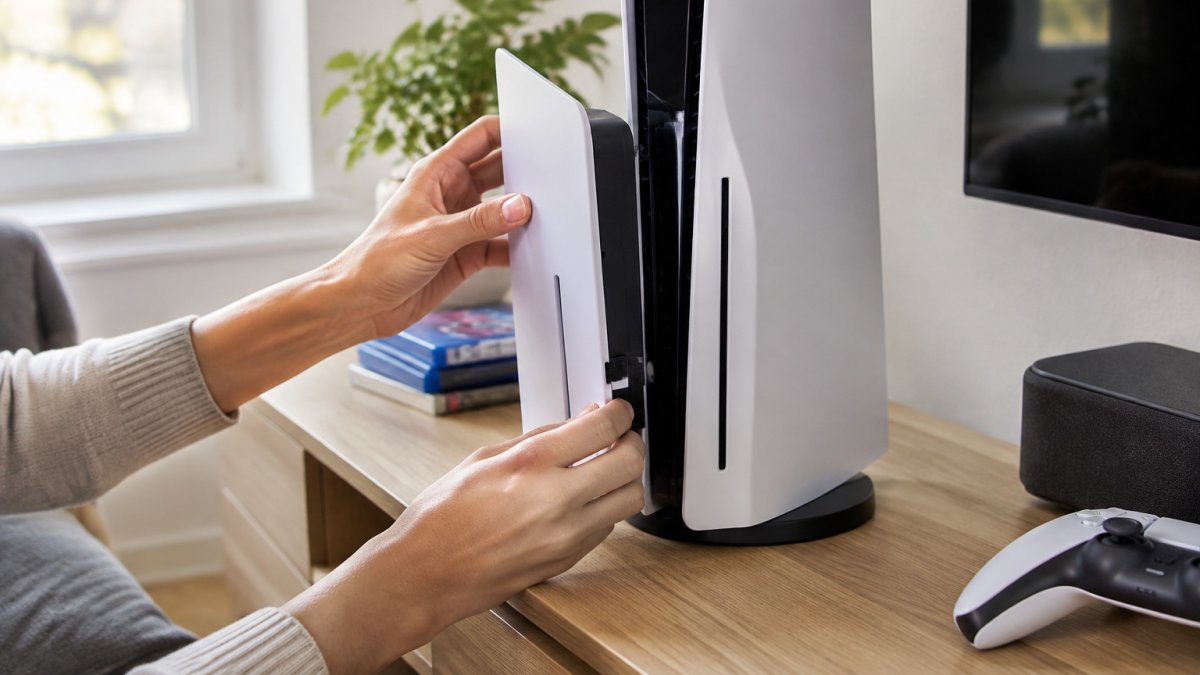
How the Detachable Disc Drive Attaches
The drive slides into a slot on the console's side panel and locks with a simple click. You can buy a compatible disc drive for your Digital Edition console here. Remove the cover plate first, align the connector, and press until it seats flush.
Checking Your Model Before You Buy
Not every PS5 Slim is the same, so check your console's model number and region before ordering a drive. Our guide to checking disc drive region compatibility walks you through it. Confirm your console's model number matches the compatibility information provided with the drive.
Essential Accessories for a New PS5 Slim Owner
A new console is only as useful as the things around it, but the order in which you buy those things matters more than the list itself. Most owners end up buying in roughly this sequence: a second controller if more than one person plays, a headset for online sessions, storage expansion once the internal drive fills, then a stand, charging dock and media remote as the setup settles. Buying in that order means each purchase solves a problem you have actually hit rather than one you might hit.
The First Four Purchases, and Why
A second DualSense controller is the most common first buy, because the console ships with one and local multiplayer is the main reason households add a second. A wireless headset comes next for anyone playing online, since the console's audio output over HDMI is designed for a television and a headset gives you voice chat without disturbing the room. Storage expansion is the third priority: game installs are large, and the internal drive fills faster than most new owners expect.
Ventilation is the purchase nobody lists: leave a few centimetres of clear space around the console so air can move freely through the vents, and avoid shelving that traps warm air against the rear exhaust.
What to Check Before You Buy Anything
Two checks save the most returns. First, confirm the accessory is listed for the Slim model specifically, not the original console, because stands, faceplates and carrying cases are shaped differently between the two. Second, check the model number on the sticker on the underside of the console against the compatibility listing on the product page, this is the same check that prevents most disc drive returns, and it applies equally to stands and skins.
The order you buy accessories in tends to follow the problems you actually run into, as the table below shows.
| Purchase | Why it comes at this stage | Check before buying |
|---|---|---|
| Second DualSense controller | Most common first buy for local multiplayer | Listed for the Slim model |
| Wireless headset | Gives voice chat without disturbing the room | Supports the console's audio output |
| Storage expansion | Internal drive fills faster than expected | Meets the console's speed and size requirements |
| Stand, charging dock, media remote | Added as the setup settles | Model number matches the compatibility listing |
| Clear space around the console | Lets air move through the vents | Avoid shelving that traps warm air at the rear |
Choosing a Vertical or Horizontal Console Stand
Both orientations work, but they suit different spaces. A vertical stand saves shelf space and keeps the console off the carpet. A horizontal placement is more stable and can make cable routing simpler on a crowded media unit. Whichever you choose, make sure the stand is designed for your exact console model, since a loose fit can affect airflow and the disc drive's seating.
Keeping Your DualSense Charged With a Charging Station
A charging dock keeps controllers ready without a tangle of cables. Look for a station that charges both controllers at once and stores them upright. Pay attention to the controller's battery life, which varies with use, so a dock that tops up between sessions often suits family households best.
Best PS5 Slim Cooling Accessories and Their Noise Trade-Offs
Cooling accessories help keep the console stable during long sessions. The trade-off is noise: a fan adds a steady hum that some players notice, particularly in quiet rooms. Choose a fan with adjustable speed so you can balance temperature against sound. Watch out: placing a fan too close to the vents can pull dust inside, so position it to direct air across the console rather than into it.
Storage, Headsets and Remotes: Filling the Gaps
These three accessories are where most setups are either finished properly or left half-done, because each has a compatibility detail that is easy to miss.
Storage Expansion Done Properly
The console's expansion slot takes an M.2 NVMe solid state drive, and the drive must meet the console's stated speed and size requirements to be recognised and to run current-generation titles directly. Fitting one means removing the side panel, unscrewing the slot cover, seating the drive at the correct angle and refitting the cover and panel. A drive that is not recognised is almost always one of three things: it does not meet the speed requirement, it is not seated fully in the slot, or the slot cover has not been refitted correctly so the console does not detect it. Format the drive from the console's storage settings once it is recognised, and keep the internal drive for the games you play most so the expansion drive holds the library.
Headsets and Audio Output
A wireless headset connects either through a USB dongle or over Bluetooth, and the two behave differently: a dongle gives lower latency and is the usual choice for online play, while Bluetooth is convenient for chat and media but can introduce noticeable delay in fast games. Check that the headset supports the console's audio output and that its microphone is compatible with in-game chat, and set the console to route game audio and voice chat to the headset rather than the television.
Media Remotes
A media remote is worth having if you watch films or streaming services on the console, because it controls playback without waking a controller and draining its battery. Check that the remote is paired for the Slim model and that it controls the console's media apps rather than only the television. For a household where the console doubles as the main media player, a remote is the accessory that gets used most often.
Building Your PS5 Slim Setup Around Your Next Purchase
Plan your setup in stages. Buy the item that solves your biggest problem first, whether that is storage, a disc drive or a second controller, and add the rest as your budget allows. Gamerium offers free UK delivery and hassle-free returns within 30 days. Browse our range to find the disc drive, stand, charging station or accessory that completes your PS5 Slim setup.
Frequently Asked Questions
Can you add a disc drive to PS5 Slim Digital Edition?
Yes. The PS5 Slim Digital Edition can take the detachable Blu-ray disc drive, which is sold separately and fits into the side of the console. Check the model compatibility notes before you buy, and install the drive while the console is switched off and unplugged. Check Gamerium's website for current stock and pricing before you order.
Do I need a vertical stand for the PS5 Slim?
A vertical stand is not required, but many owners use one because the PS5 Slim can be positioned either flat or upright. Vertical stands save desk or shelf space and can help airflow if the console sits in a cabinet. Horizontal placement works well on a media unit with clear space above the vents. Whichever orientation you choose, leave a few centimetres of clearance around the vents so the console can breathe properly.
What are the essential accessories for a new PS5 Slim owner?
Most new owners start with a DualSense charging station or a pair of charging cables, a spare controller if more than one person plays, a dust cover or cabinet with ventilation, and a wired or wireless headset. A storage expansion drive is useful if you download many large games. Prices vary with model and retailer, so check Gamerium's website for current pricing on the accessories you need.
Are third-party accessories safe for the PS5 Slim?
Reputable third-party accessories can be used safely if they are CE or UKCA marked and sold with clear product information. Avoid unbranded chargers and cables with no safety markings, as poor-quality power supplies can damage controllers or create a fire risk. Check that any cooling fan or stand does not block the console's vents, and keep firmware up to date so the console recognises the accessory correctly.
